


3.0.55 | Feb 03, 2022 | 5.0 MB
Compatible with Windows 11, Windows 10, Windows 8.1,
Windows 8, and
Windows 7
Port Forward Network Utilities is a set of software tools to help get your ports forwarded. Our Network Utilities software includes everything you need to diagnose, troubleshoot, and fix port forwarding issues, including:



When you purchase Network Utilities we make sure that your ports get forwarded.

Forward ports today for only $39.95
Compatible with Windows 11, Windows 10, Windows 8.1, Windows 8, and Windows 7
| Feature | Free | Pro |
| Handles Multiple Routers |  |
|
| Automatically finds your router | |
|
| Finds your external IP address | |
|
| Determines if you are double routered | |
|
| Makes logging in to your router easy | |
|
| Lists all IP addresses on your computer | |
|
| Quickly switch between static and dynamic IP address | |
|
| Remembers IP configuration settings for multiple locations | |
|
| Automatically detect DNS servers | |
|
| 100% guaranteed port checker | |
|
| Tests both TCP and UDP | |
|
| Recover Lost or Forgotten Router Passwords | |
|
| Automatically Login to your Router | |
|
| Automatically Configures Port Forwards in Your Router | |
|
| Works With Xbox Series X|S, Xbox One, and Xbox 360 | |
|
| Works With PlayStation 5, PlayStation 4, and PlayStation 3 | |
|
| Makes Downloads Faster | |
|
| Optimizes Space in Router | |
|
| Increases Security by closing ports when not in use | |
|
| Removes Old Forwards and Creates New Ones | |
|
| Configures Router's Firewall | |
|
| Fully Manages Router's Forwarding List | |
|
| Configures Access For Web Cameras | |
|
Get It Now! |
 Free Trial Free Trial
|
 Buy Now Buy Now
|
I bought your program to help with Port Forwarding and it solved my problem with the first use.
I have recommended this program to my friends because it does what its supposed to do and the awesome support.
YES it works!!! I'm able to connect to my Minecraft server yes! Thank you so much!
Followed your instructions and ran PFConfig to delete my forwarded ports and.... IT WORKS!!!!
It works!! You dont know how much I can thank you!
Thanks for replying so fast, the customer service is amazing.
Forwarding a port should be easy! With Network Utilities it can't get any easier!
Our software is the easiest way to get an open port. Hereâs how it works.
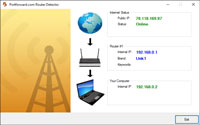
First you run the Router Detector to locate your router on your network and ensure that you only have 1 router.
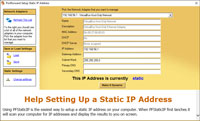
After that you use the Static IP Setter to ensure that your PC has a static IP address. This is helpful in diagnosing open port issues because some routers refuse to forward a port to a dynamic IP address.
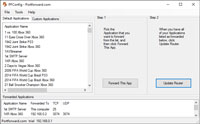
Then you run PFConfig to setup a port forward in your router. PFConfig logs in to your router and configures it automatically.
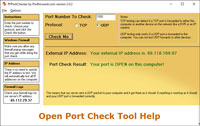
Finally you use the Port Checker to see if your port is open. You specify the port that you want to test and our server tries to connect. When our server connects then we know that the port has been forwarded and is now open.
PFConfig, part of Network Utilities, makes it very easy to get an open port. We have some tutorial videos showing you some of the basic features of how PFConfig works.
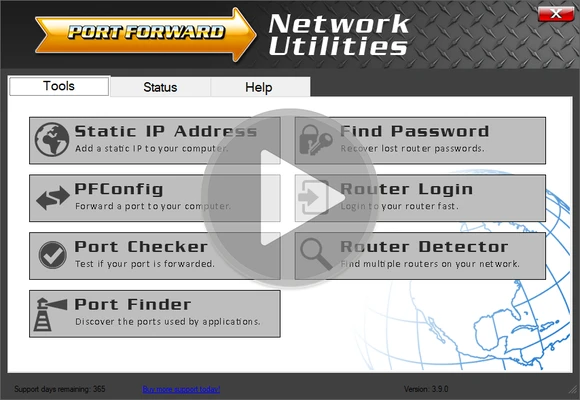
Our video tutorials will help you get an idea of some of the common ways that PFConfig is used, as well as some of our other tools.
Be sure to watch our videos for more examples.